Multi-Agent Workflows with Claude Skills: Parallel Execution & Orchestration
Learn how to build multi-agent workflows using Claude Skills. Covers parallel execution, agent orchestration patterns, evaluation loops, and real-world automation pipelines.
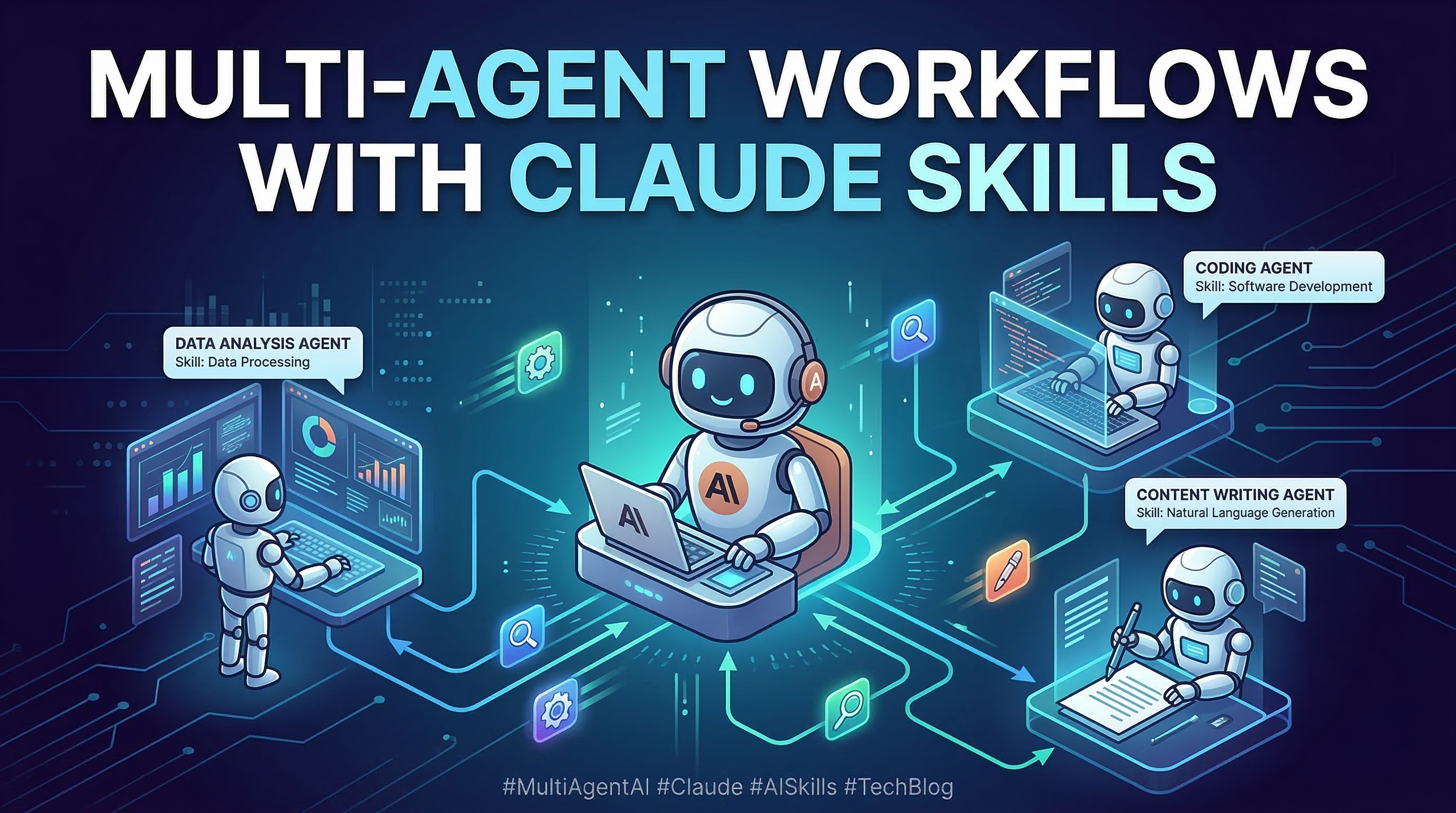
Building software with a single AI agent is powerful. Building it with a coordinated team of AI agents is transformative. Since Anthropic released Agent Teams support in early 2026, developers have been discovering that the real leverage comes not from prompting a single Claude instance harder—it comes from designing workflows where multiple specialized agents divide, conquer, and verify work in parallel.
Claude Skills make this practical. Instead of manually wiring sub-agent calls, you install a few skill files, describe your goal, and Claude handles the orchestration. This guide walks through the key patterns, the specific skills that implement them, and how to build reliable pipelines that self-correct when something goes wrong.
Why Multi-Agent Workflows Beat Single-Agent Loops
A single Claude instance working sequentially through a complex task faces two fundamental bottlenecks: time and context. A research task that requires pulling 20 sources, synthesizing them, writing a draft, and fact-checking it could easily consume 40–60 minutes of sequential work—and risk filling the context window with earlier steps, degrading quality on later ones.
Multi-agent architecture breaks this constraint on both fronts. Parallel agents eliminate the time bottleneck: research, synthesis, and drafting can happen concurrently. Context isolation eliminates the contamination problem: each agent starts fresh, focused only on its assigned subtask.
The tradeoff is coordination overhead. You need a way to split tasks, assign them, collect results, and verify quality. That is exactly what the Claude Skills ecosystem addresses.
The Three Core Orchestration Patterns
Before writing any code or installing any skills, you need to pick the right architecture for your use case. The Multi-Agent Architecture Patterns skill is the best starting point—it documents three proven patterns with concrete trade-offs.
Supervisor/Orchestrator: A single coordinator agent breaks the goal into subtasks, dispatches them to worker agents, and merges results. Best for workflows with a clear sequential dependency between stages (e.g., research → outline → draft → review). The coordinator maintains the global plan; workers stay focused.
Peer-to-Peer/Swarm: Agents communicate directly with each other through a shared messaging system. No single coordinator. Best for exploratory tasks where the solution path is unknown and agents need to collectively discover the right approach. Higher coordination overhead, but more adaptive.
Hierarchical: Multiple layers of coordinators and workers. A top-level orchestrator manages mid-level coordinators, each of which manages a pool of specialists. Best for very large tasks (e.g., migrating an entire codebase) where a flat structure would overwhelm a single coordinator's context.
Most teams start with Supervisor and move to Hierarchical only when the task genuinely exceeds what one coordinator can track. Peer-to-Peer is the right choice for creative or research-heavy workflows where you want agents to challenge each other's conclusions.
Installing the Multi-Agent Skills Toolkit
The skills that implement these patterns are available on ClaudeSkills Hub. Install them by copying the skill files into your project's .claude/skills/ directory:
# Create the skills directory if it doesn't exist
mkdir -p .claude/skills

# Download the core multi-agent skills
curl -L https://claudeskills.info/api/skills/do-in-parallel/download -o /tmp/do-in-parallel.zip
curl -L https://claudeskills.info/api/skills/do-and-judge/download -o /tmp/do-and-judge.zip
curl -L https://claudeskills.info/api/skills/agent-evaluation/download -o /tmp/agent-evaluation.zip
curl -L https://claudeskills.info/api/skills/multi-agent-patterns/download -o /tmp/multi-agent-patterns.zip

# Extract each into the skills directory
for f in do-in-parallel do-and-judge agent-evaluation multi-agent-patterns; do
  unzip -q /tmp/${f}.zip -d .claude/skills/
done

echo "Skills installed:"
ls .claude/skills/
Once installed, Claude Code will automatically detect and apply these skills when you describe a multi-agent task. You do not need to invoke them by name—they activate based on the trigger conditions defined in each skill's frontmatter.
Parallel Dispatch: Running Tasks Concurrently
The Parallel Agent Dispatch skill is the workhorse of multi-agent workflows. It takes a goal, decomposes it into independent subtasks using Zero-shot Chain-of-Thought reasoning, verifies that the subtasks genuinely do not depend on each other's outputs, and then launches them as concurrent sub-agents with intelligent model selection.
The independence verification step is important and often overlooked by developers building custom orchestration from scratch. If task B depends on an output from task A, running them in parallel produces race conditions or stale data. The skill's pre-flight check catches these dependencies before any API calls are made, saving you from debugging subtle failures downstream.
Here is a concrete example of what the skill handles automatically when you ask: "Research the competitive landscape for AI coding tools, benchmark three products, and summarize findings for a product team."
Goal: Competitive landscape analysis for AI coding tools

Decomposition (auto-generated by do-in-parallel):
  Agent 1: Research GitHub Copilot — features, pricing, recent updates
  Agent 2: Research Cursor — features, pricing, recent updates
  Agent 3: Research Claude Code — features, pricing, recent updates

Independence check: PASS (agents read from web, do not depend on each other)
Model selection: claude-opus-4-6 for research depth
Batch schedule: Launch all 3 simultaneously

Merge step (coordinator): Synthesize Agent 1-3 outputs into unified report
The total elapsed time for this workflow is roughly the time for a single research task, not three. For large-scale analysis jobs, this compounds dramatically—a workflow that would take 2 hours sequentially can complete in 25–35 minutes with parallel dispatch.
Evaluation Loops: Agents That Self-Correct
Parallel execution solves the speed problem. But speed without quality control creates a different problem: garbage in, garbage out—faster. The Execute and Judge Loop skill addresses this by wrapping every agent execution in an automatic verification step.
The pattern works like this: an executor agent produces an output, and a separate judge agent (with a clean context window) scores that output against a multi-dimensional rubric. If the score falls below the configured threshold, the executor retries with the judge's critique as additional context. The loop continues until the output meets the bar or the maximum retry count is reached.
The judge operates in strict role separation from the executor. This is architecturally significant: the same agent that produced the output cannot be its own critic, because it is anchored to its own reasoning. The LLM-as-Judge Evaluator skill formalizes this with Chain-of-Thought scoring and evidence-backed assessments, making the evaluation transparent and auditable.
# Conceptual representation of the do-and-judge loop
# (actual execution is handled by the skill, not manual code)

def execute_and_judge(task, max_retries=3, min_score=0.75):
    for attempt in range(max_retries):
        output = executor_agent.run(task)

        # Judge runs in isolated context — no access to executor's reasoning
        evaluation = judge_agent.score(output, rubric={
            "accuracy": 0.4,      # 40% weight
            "completeness": 0.3,  # 30% weight
            "clarity": 0.2,       # 20% weight
            "format": 0.1         # 10% weight
        })

        if evaluation.score >= min_score:
            return output

        # Retry with critique as context
        task = task + f"\n\nPrevious attempt scored {evaluation.score:.2f}. " \
                      f"Critique: {evaluation.critique}"

    raise MaxRetriesExceeded(f"Could not meet quality threshold after {max_retries} attempts")
In practice, most tasks converge within 1–2 retries. The retry overhead is minimal compared to the cost of catching low-quality outputs after they have been merged into a downstream workflow.
Measuring and Improving Agent Performance
Once your workflow is running, the next question is: how do you know if it is actually working well? Intuition breaks down quickly when you have 5+ agents operating in parallel across dozens of runs.
The Agent Evaluation Framework skill provides structured measurement. It scores agent outputs across multiple dimensions (task completion, reasoning quality, tool use efficiency, output format compliance) and aggregates them into a composite score. Critically, it also surfaces performance variance—a skill that averages 0.82 but swings between 0.60 and 0.95 across runs is less reliable than one that consistently scores 0.78.
Run the evaluation skill periodically as a quality gate:
# After a batch of agent runs, evaluate the outputs
# Claude will activate the agent-evaluation skill automatically
claude "Evaluate the quality of the research outputs in /tmp/agent-outputs/
        using the agent evaluation framework. Score each output and
        identify the lowest-performing agents for review."
The evaluation results become training data for your own iteration: which skill configurations produce the most consistent results, which task decompositions create coordination problems, and where increasing the judge's threshold would meaningfully improve output quality.
Putting It Together: A Production-Ready Research Pipeline
Here is how these skills combine into a complete workflow for a common real-world task—generating a comprehensive competitive analysis report:
# One-shot prompt that activates the full multi-agent pipeline
claude "
Goal: Create a 3,000-word competitive analysis of AI coding assistants for Q1 2026.

Requirements:
- Cover at least 5 products with features, pricing, and recent updates
- Include a comparison matrix
- Cite sources for all claims
- Score: minimum 0.80 on the agent-evaluation rubric

Use parallel dispatch to research products concurrently,
then evaluate the research quality before synthesizing the final report.
Output to /tmp/competitive-analysis-q1-2026.md
"
Claude Code detects the multi-agent patterns, activates do-in-parallel for the research phase, runs do-and-judge on each research output, and then synthesizes the verified outputs into the final report. A task that previously required careful prompt chaining across multiple manual steps now runs end-to-end with a single instruction.
Getting Started
The multi-agent skills described in this guide are available on ClaudeSkills Hub:
- Multi-Agent Architecture Patterns — reference guide for choosing the right pattern
- Parallel Agent Dispatch — concurrent subtask execution with independence verification
- Execute and Judge Loop — self-correcting execution with LLM-as-Judge verification
- Agent Evaluation Framework — multi-dimensional scoring and variance analysis
Browse the full catalog at claudeskills.info to find skills that match your specific workflow. Each skill is open source, version-controlled, and can be customized by editing the skill file directly in your .claude/skills/ directory.
Multi-agent workflows are not inherently more complex than single-agent ones—they just require thinking about task decomposition and quality verification upfront. With the right skills installed, the orchestration layer handles itself, and you can focus on defining what you want rather than how to coordinate the work to get it.