Claude Code as Your AI OS: Skills, Hooks, Subagents & MCP 2026
Turn Claude Code into a complete AI operating system with Skills, Hooks, Subagents, and MCP. Step-by-step setup guide for developers in 2026.
Most people think of Claude Code as an AI coding assistant. That's like calling macOS "a text editor."
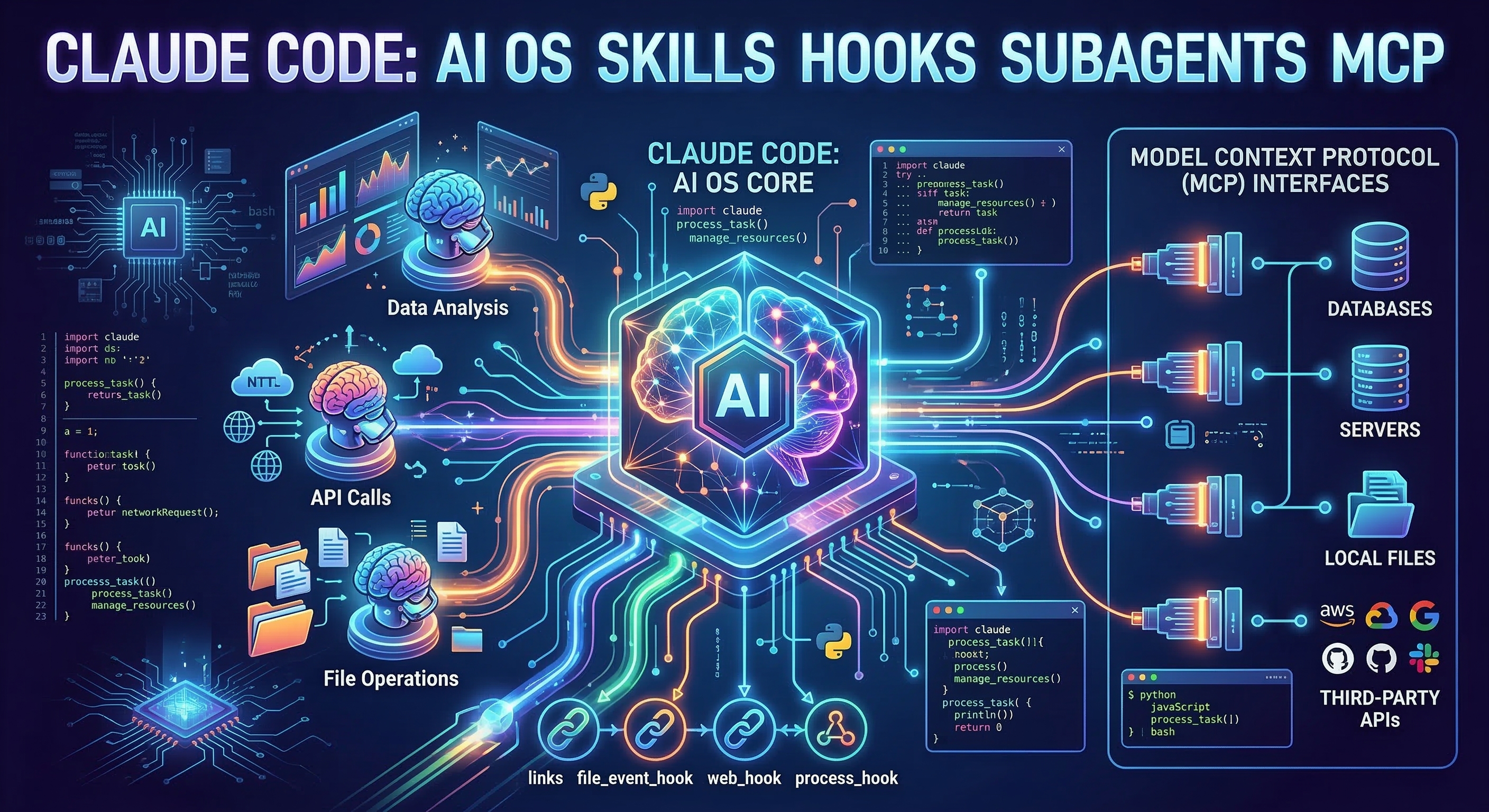
Claude Code in 2026 is better understood as an AI operating system — a platform you configure once that amplifies every workflow you run through it. The architecture has four components: Skills, Hooks, Subagents, and MCP. Used together, they form something qualitatively different from a chat interface with autocomplete.
This guide explains each component, how they complement each other, and how to build your own AI OS from scratch.
The Four Pillars: A Mental Model
Before setup, here's a map of what each component does and when you actually need it:
| Component | Role | When to use |
|---|---|---|
| Skills | Claude's long-term memory and expertise | Always — the foundation |
| Hooks | Automatic reflexes that fire on events | For quality gates and audit trails |
| MCP | Real-time connections to external systems | When Claude needs live data |
| Subagents | Parallel, isolated Claude sessions | For large or independent tasks |
Think of it this way: Skills are your AI's education, Hooks are its reflexes, MCP is its senses, and Subagents are its hands.
Pillar 1: Skills — Long-Term Memory
Skills are Markdown files that tell Claude how to behave in specific situations. Drop them in ~/.claude/skills/ (global) or .claude/skills/ (project-specific) and Claude loads the relevant ones automatically based on context.
# Install a skill globally
mkdir -p ~/.claude/skills/
cp -r downloaded-skill/ ~/.claude/skills/skill-name/

# Or install just for one project
mkdir -p .claude/skills/
cp -r downloaded-skill/ .claude/skills/skill-name/
Each skill has a SKILL.md file with frontmatter that controls when Claude loads it:
---
name: code-reviewer
description: Use when reviewing code changes, pull requests, or evaluating code quality
---

# Code Review Guidelines
[Full instructions here — only loaded when relevant]
The architecture is clever: Claude scans all frontmatter at session start (roughly 20–50 tokens per skill), then loads full content only when a task matches. A library of 50 skills adds ~2,000 tokens of overhead — far less than one verbose CLAUDE.md.
A strong starting set for developers:
- superpowers — meta-skill for orchestrating other skills and subagents
- skill-creator — helps you build and iterate on new skills
- mcp-builder — scaffolds new MCP server integrations
- webapp-testing — automated browser testing workflows
Pillar 2: Hooks — Automatic Reflexes
Hooks are shell commands that Claude Code fires automatically on specific events. They're configured in ~/.claude/settings.json and run regardless of what Claude is doing — making them ideal for non-negotiable rules.
{
  "hooks": {
    "PostToolUse": [
      {
        "matcher": "Edit",
        "hooks": [
          {
            "type": "command",
            "command": "cd $CLAUDE_PROJECT_DIR && npx tsc --noEmit 2>&1 | head -20"
          }
        ]
      }
    ],
    "PreToolUse": [
      {
        "matcher": "Bash",
        "hooks": [
          {
            "type": "command",
            "command": "echo \"[$(date)] $CLAUDE_TOOL_INPUT\" >> ~/.claude/logs/bash-audit.log"
          }
        ]
      }
    ]
  }
}
The key hook events:
PreToolUse— fires before Claude uses any tool (safety checks, audit logs)PostToolUse— fires after a tool completes (linting, type-checking, test runs)SessionStart— fires when a new session begins (load context, check environment)SessionEnd— fires on exit (cleanup, summaries)
The PostToolUse hook above runs TypeScript type-checking after every file edit. Claude sees the output immediately and can fix errors inline — no manual tsc runs, no "I forgot to check types" incidents.
The critical advantage of hooks over Skills: they fire unconditionally. A hook that blocks rm -rf on production paths is more reliable than a Skill instruction saying "be careful with deletions." Rules that matter should be hooks.
Pillar 3: MCP — Real-Time Connections
MCP (Model Context Protocol) gives Claude live access to external systems. Skills encode what Claude knows statically; MCP delivers what Claude needs to know dynamically — current database state, open PRs, API responses.
Configure servers in ~/.claude/mcp.json:
{
  "mcpServers": {
    "github": {
      "command": "npx",
      "args": ["-y", "@modelcontextprotocol/server-github"],
      "env": {
        "GITHUB_PERSONAL_ACCESS_TOKEN": "your-token"
      }
    },
    "postgres": {
      "command": "npx",
      "args": ["-y", "@modelcontextprotocol/server-postgres",
               "postgresql://localhost/mydb"]
    },
    "filesystem": {
      "command": "npx",
      "args": ["-y", "@modelcontextprotocol/server-filesystem",
               "/path/to/your/project"]
    }
  }
}
Once connected, Claude can query your database while debugging a data issue, check GitHub for related PRs while reviewing code, or read API documentation from your internal docs server.
The mcp-builder skill is worth installing before you start wiring up custom internal services — it scaffolds the boilerplate and handles authentication patterns for common setups.
Pillar 4: Subagents — Parallel Execution
Subagents let Claude spawn fresh, isolated sessions to handle independent tasks. They're invoked via the Agent tool inside Skills, and they run with their own context windows so heavy work doesn't pollute the main session.
Here's a real example from a code review skill:
When reviewing a large pull request (>20 files):

1. Identify independent review domains: security, performance, style
2. Use the Agent tool to spawn three parallel subagents:
   - Security review: check for vulnerabilities, injection risks, auth bypasses
   - Performance review: check for N+1 queries, unnecessary re-renders, memory leaks
   - Style review: check naming, structure, test coverage
3. Each subagent has access only to the relevant files
4. Collect all three results and synthesize a unified review
The superpowers collection includes several skills built specifically around subagent orchestration — a good reference for patterns like fan-out research, parallel code generation, and multi-agent debugging.
The main use cases for subagents:
- Context isolation: tasks that need deep research without polluting conversation history
- Parallelism: independent subtasks that can run concurrently
- Specialization: subagents configured with different skills than the parent
A Complete Developer Setup
Here's what the four pillars look like combined in a TypeScript web project:
~/.claude/                         # Global config
├── CLAUDE.md                      # Who you are, your preferences
├── skills/
│   ├── superpowers/               # Subagent orchestration
│   ├── skill-creator/             # Build new skills
│   └── code-reviewer/             # PR review workflows
├── settings.json                  # Hooks: tsc after edits, bash audit log
└── mcp.json                       # GitHub + database MCP servers

.claude/                           # Project-specific config
├── CLAUDE.md                      # This project: tech stack, key contacts
└── skills/
    ├── project-conventions/       # This codebase's specific rules
    └── deployment/                # Deploy scripts and checklists
With this setup:
- Claude knows your conventions without being reminded (Skills)
- Type errors get flagged after every edit (Hooks)
- Claude can query the database when debugging (MCP)
- Large reviews run in parallel without bloating context (Subagents)
Recommended Progression
You don't need all four components immediately. The payoff scales with the investment:
Week 1 — Skills only. Browse claudeskills.info, install 3–5 that match your workflow. This alone will noticeably change how Claude handles your work.
Week 2 — Add one PostToolUse Hook for your most important quality check (TypeScript, ESLint, or your test runner).
Week 3 — Connect one MCP server. GitHub is the easiest starting point and immediately useful for code review workflows.
Month 2 — Add Subagent patterns when you notice tasks that are too large for one context or would benefit from parallel execution.
The Bigger Picture
Claude Code is increasingly the interface through which developers interact with their entire stack — not just the code editor, but the CI pipeline, the database, the deployment process, the documentation.
The AI OS framing isn't metaphor. It's a description of what happens when Skills, Hooks, MCP, and Subagents are configured correctly: Claude stops feeling like a tool you invoke and starts feeling like a collaborator who knows your project, enforces your standards automatically, and has live access to your data.
All of this is available today. Start at claudeskills.info and find the Skills that fit your workflow first.