How to Create Claude Skills: Step-by-Step Custom Skill Guide
Learn how to create Claude Skills from scratch. A step-by-step guide to building, testing, and publishing your own custom Claude Skills for the community.
Why Create Claude Skills?
Every development team has unique workflows, conventions, and best practices. Learning how to create Claude Skills lets you encode these into reusable, shareable packages that any team member can activate.
Common reasons to create Claude Skills:
- Standardize team workflows: Create Claude Skills that ensure everyone follows the same process
- Capture institutional knowledge: Create Claude Skills that document what experienced developers know implicitly
- Automate repetitive patterns: Create Claude Skills that turn common multi-step tasks into single commands
- Share with the community: Create Claude Skills and help others solve problems you've already solved
Claude Skill Anatomy
When you create Claude Skills, each one is fundamentally a markdown file with specific structure. Here's the minimum viable Claude Skill:
---
name: my-custom-skill
description: Brief description of what this skill does
---

# My Custom Skill

## When to Use

Use this skill when [specific trigger conditions].

## Workflow

1. Step one
2. Step two
3. Step three

## Rules

- Rule one
- Rule two
Key Sections
Frontmatter
The YAML frontmatter defines metadata:
---
name: skill-name          # kebab-case identifier
description: What it does  # One-line summary
---
When to Use
Clearly define trigger conditions. Claude uses this to decide when to activate the skill:
## When to Use

Use this skill when:
- Writing new tests for existing code
- Fixing a bug that needs a regression test
- Implementing a feature using TDD
Workflow
The step-by-step process Claude should follow:
## Workflow

1. Read the existing code to understand the current behavior
2. Write a test that captures the expected behavior
3. Run the test and verify it fails
4. Write the minimum code to make the test pass
5. Refactor if needed while keeping tests green
Rules
Hard constraints that Claude must follow:
## Rules

- NEVER skip the failing test step
- ALWAYS run tests after each change
- Keep each test focused on one behavior
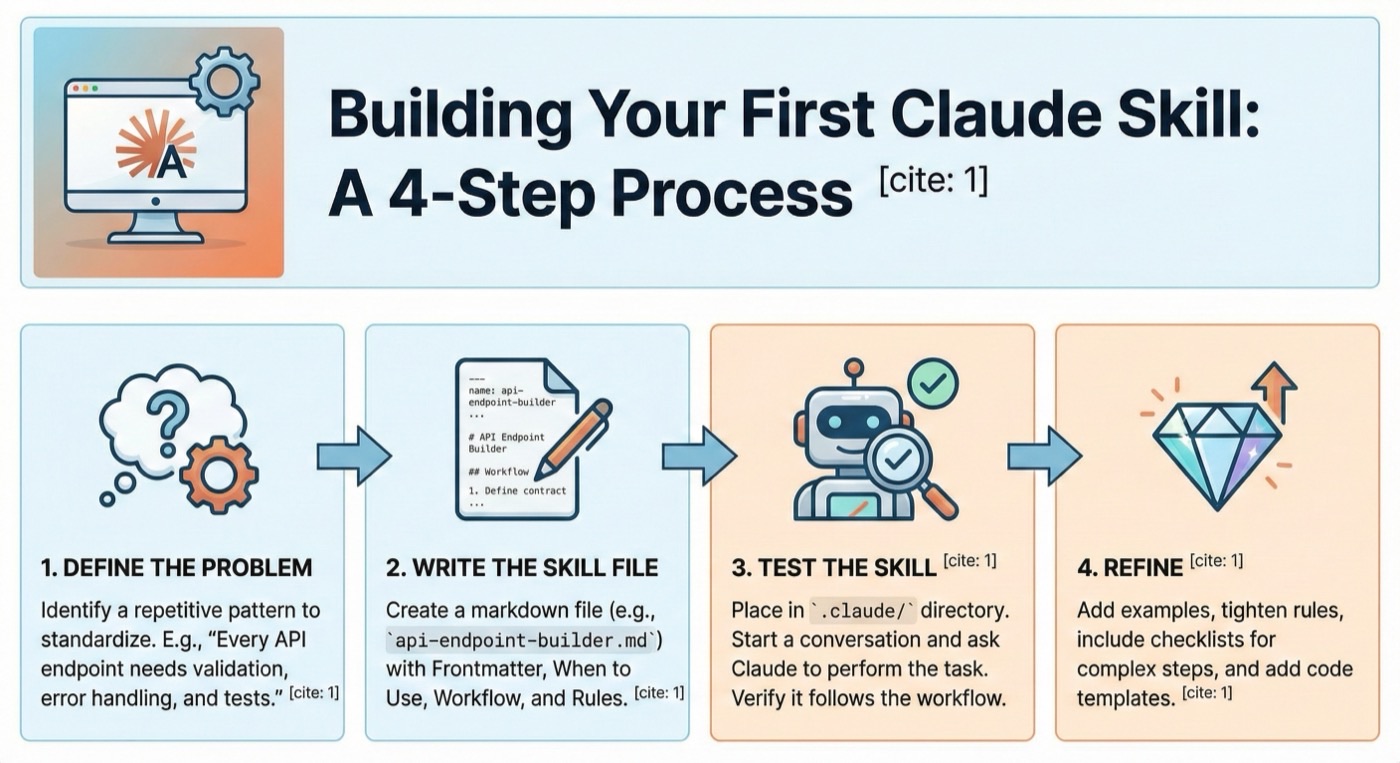
Building Your First Claude Skill
Let's create a Claude Skill for consistent API endpoint development. Follow these steps to create Claude Skills from scratch.
Step 1: Define the Problem
Before you create Claude Skills, identify the repetitive pattern you want to standardize. For our example: "Every API endpoint needs input validation, error handling, logging, and tests."
Step 2: Write the Claude Skill File
To create Claude Skills, start by writing a markdown file. Create api-endpoint-builder.md:
---
name: api-endpoint-builder
description: Build consistent API endpoints with validation, error handling, and tests
---

# API Endpoint Builder

## When to Use

Use when creating a new API endpoint or route handler.

## Workflow

1. Define the endpoint contract (method, path, input, output)
2. Create input validation schema
3. Write the route handler with error boundaries
4. Add structured logging
5. Write integration tests
6. Update API documentation

## Template

### Input Validation
Every endpoint must validate inputs before processing:

- Use Zod/Yup schemas for request body
- Validate path parameters
- Check required headers

### Error Handling
Wrap handler logic in try/catch:

- Return appropriate HTTP status codes
- Include error details in development
- Log errors with context

### Testing Checklist
- [ ] Happy path test
- [ ] Invalid input test
- [ ] Authentication test
- [ ] Rate limiting test
Step 3: Test the Claude Skill
Place the Claude Skill in your .claude/ directory and test it:
- Start a conversation
- Ask Claude to create a new endpoint
- Verify the Claude Skill follows your defined workflow
- Iterate on the Claude Skill based on results
Step 4: Refine
Common refinements:
- Add more specific examples
- Tighten rules where Claude deviates
- Add checklists for complex steps
- Include code templates for common patterns
Advanced Patterns for Creating Claude Skills
Once you know how to create Claude Skills with the basics, these advanced patterns take your skills to the next level.
Checklists with Enforcement
When you create Claude Skills, checklists help enforce tracking:
## Checklist (MANDATORY - create TodoWrite for each item)

- [ ] Input validation schema created
- [ ] Error handling added
- [ ] Logging implemented
- [ ] Happy path test written
- [ ] Edge case tests written
- [ ] Documentation updated
Conditional Logic
Skills can include conditional branches:
## Workflow

1. Determine the endpoint type:
   - **GET**: Skip input validation for body, focus on query params
   - **POST/PUT**: Full input validation required
   - **DELETE**: Validate permissions and ownership
Skill Composition
Reference other skills:
## Workflow

1. Use the **brainstorming** skill to define the endpoint contract
2. Use the **TDD** skill to implement with tests
3. Use the **code-review** skill to verify quality
Publishing Your Claude Skills
On Claude Skills Hub
After you create Claude Skills, share them with the community:
- Create a GitHub repository with your Claude Skill
- Add a clear README with usage instructions
- Visit Claude Skills Hub and submit your repository
- Our team reviews Claude Skills submissions for quality and safety
Requirements for Publishing Claude Skills
- Repository must be public
- Include a valid Claude Skill definition file
- Provide clear documentation
- No malicious code or harmful patterns
- Follow security best practices
Tips for Creating Great Claude Skills
- Be specific: When you create Claude Skills, vague instructions produce vague results. Tell Claude exactly what to do.
- Include examples: Show what good output looks like in your Claude Skills.
- Add guardrails: Define what Claude should NOT do, not just what it should.
- Test with edge cases: Try unusual inputs to find gaps in your Claude Skills.
- Iterate: Claude Skills improve over time. Update based on real usage.
Community Claude Skills Contributions
The Claude Skills ecosystem thrives on community contributions. Many developers who learn how to create Claude Skills end up sharing their best work publicly — some of the most popular skills started as internal tools.
If you know how to create Claude Skills that solve a common problem, consider contributing. The community benefits from diverse perspectives and real-world testing.
Visit the submission page to share your skills with the world.