Claude Agent Skills API Guide: Using Skills with the Claude API
Claude Agent Skills API guide — learn how to use Agent Skills with the Claude API. Complete guide to the Claude Agent Skills API with code examples in Python, TypeScript, and cURL.
This article is based on Anthropic's official documentation on Using Agent Skills with the API.
The Claude Agent Skills API extends Claude's capabilities through organized folders of instructions, scripts, and resources. This Claude Agent Skills API guide shows you how to use both pre-built and custom Agent Skills with the Claude API.
Claude Agent Skills API Overview
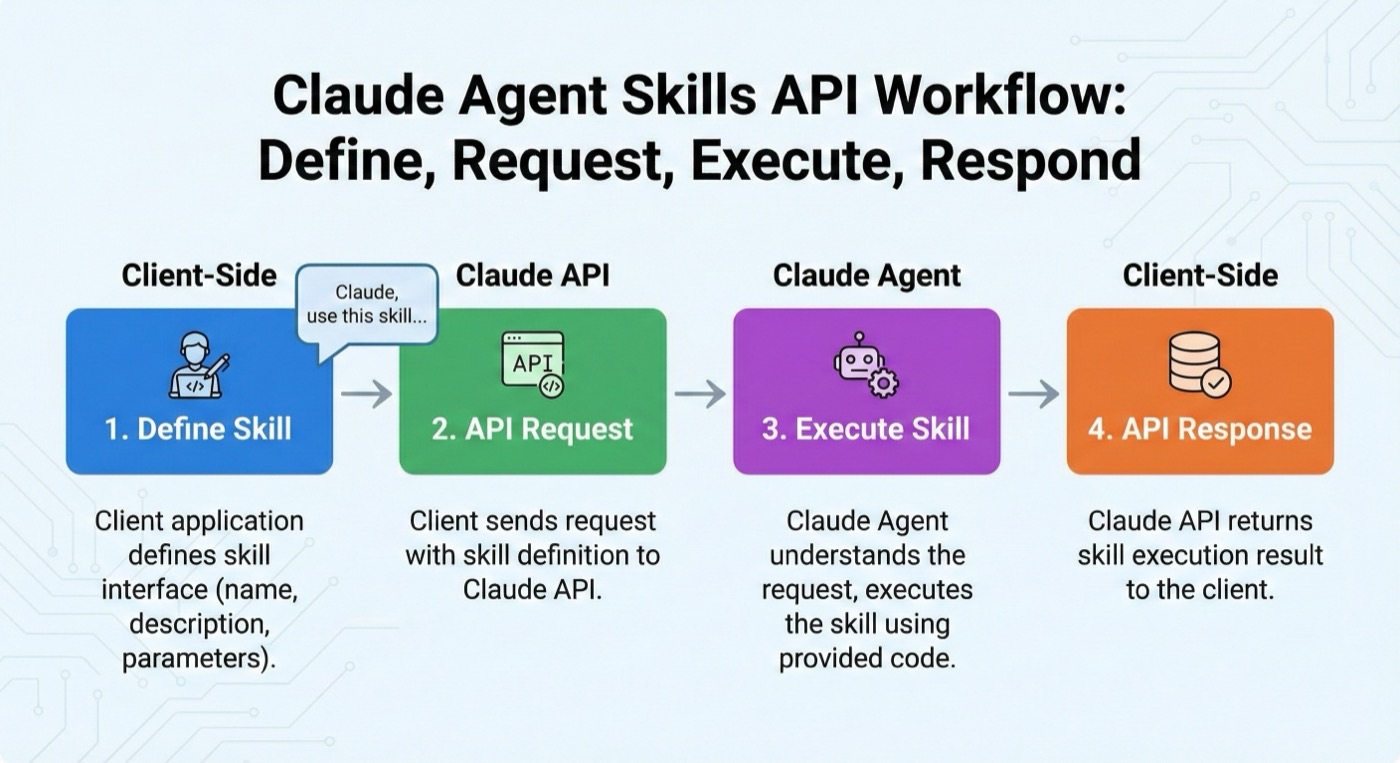
The Claude Agent Skills API integrates with the Messages API through the code execution tool. Whether using pre-built Agent Skills managed by Anthropic or custom Agent Skills you've uploaded, the Claude Agent Skills API integration is identical — both require code execution and use the same container structure.
Claude Agent Skills API: Anthropic Skills vs Custom Skills
| Aspect | Anthropic Skills | Custom Skills |
|---|---|---|
| Type value | anthropic | custom |
| Skill IDs | Short names: pptx, xlsx, docx, pdf | Generated: skill_01AbCdEfGhIjKlMnOpQrStUv |
| Version format | Date-based: 20251013 or latest | Epoch timestamp: 1759178010641129 or latest |
| Management | Pre-built and maintained by Anthropic | Upload and manage via Skills API |
| Availability | Available to all users | Private to your workspace |
Claude Agent Skills API Prerequisites
To use the Claude Agent Skills API, you need:
- Anthropic API key from the Console
- Beta headers:
code-execution-2025-08-25- Enables code execution (required for Skills)skills-2025-10-02- Enables Skills APIfiles-api-2025-04-14- For uploading/downloading files to/from container
- Code execution tool enabled in your requests
Using Agent Skills in the Claude API
Container Parameter
In the Claude Agent Skills API, Agent Skills are specified using the container parameter in the Messages API. You can include up to 8 Agent Skills per request.
import anthropic

client = anthropic.Anthropic()

response = client.beta.messages.create(
    model="claude-sonnet-4-5-20250929",
    max_tokens=4096,
    betas=["code-execution-2025-08-25", "skills-2025-10-02"],
    container={
        "skills": [{"type": "anthropic", "skill_id": "pptx", "version": "latest"}]
    },
    messages=[
        {"role": "user", "content": "Create a presentation about renewable energy"}
    ],
    tools=[{"type": "code_execution_20250825", "name": "code_execution"}],
)
TypeScript equivalent:
import Anthropic from "@anthropic-ai/sdk";

const client = new Anthropic();

const response = await client.beta.messages.create({
  model: "claude-sonnet-4-5-20250929",
  max_tokens: 4096,
  betas: ["code-execution-2025-08-25", "skills-2025-10-02"],
  container: {
    skills: [{ type: "anthropic", skill_id: "pptx", version: "latest" }]
  },
  messages: [{
    role: "user",
    content: "Create a presentation about renewable energy"
  }],
  tools: [{ type: "code_execution_20250825", name: "code_execution" }]
});
Downloading Generated Files
When Skills create documents, they return file_id attributes in the response. Use the Files API to download these files:
- Skills create files during code execution
- Response includes
file_idfor each created file - Use Files API to download the actual file content
# Step 1: Use a Skill to create a file
response = client.beta.messages.create(
    model="claude-sonnet-4-5-20250929",
    max_tokens=4096,
    betas=["code-execution-2025-08-25", "skills-2025-10-02"],
    container={
        "skills": [{"type": "anthropic", "skill_id": "xlsx", "version": "latest"}]
    },
    messages=[
        {"role": "user", "content": "Create an Excel file with a budget spreadsheet"}
    ],
    tools=[{"type": "code_execution_20250825", "name": "code_execution"}],
)

# Step 2: Extract file IDs from the response
def extract_file_ids(response):
    file_ids = []
    for item in response.content:
        if item.type == "bash_code_execution_tool_result":
            content_item = item.content
            if content_item.type == "bash_code_execution_result":
                for file in content_item.content:
                    if hasattr(file, "file_id"):
                        file_ids.append(file.file_id)
    return file_ids

# Step 3: Download each file
for file_id in extract_file_ids(response):
    file_metadata = client.beta.files.retrieve_metadata(
        file_id=file_id, betas=["files-api-2025-04-14"]
    )
    file_content = client.beta.files.download(
        file_id=file_id, betas=["files-api-2025-04-14"]
    )
    file_content.write_to_file(file_metadata.filename)
    print(f"Downloaded: {file_metadata.filename}")
Multi-Turn Conversations
Reuse the same container across multiple messages by specifying the container ID:
# First request creates container
response1 = client.beta.messages.create(
    model="claude-sonnet-4-5-20250929",
    max_tokens=4096,
    betas=["code-execution-2025-08-25", "skills-2025-10-02"],
    container={
        "skills": [{"type": "anthropic", "skill_id": "xlsx", "version": "latest"}]
    },
    messages=[{"role": "user", "content": "Analyze this sales data"}],
    tools=[{"type": "code_execution_20250825", "name": "code_execution"}],
)

# Continue conversation with same container
messages = [
    {"role": "user", "content": "Analyze this sales data"},
    {"role": "assistant", "content": response1.content},
    {"role": "user", "content": "What was the total revenue?"},
]

response2 = client.beta.messages.create(
    model="claude-sonnet-4-5-20250929",
    max_tokens=4096,
    betas=["code-execution-2025-08-25", "skills-2025-10-02"],
    container={
        "id": response1.container.id,  # Reuse container
        "skills": [{"type": "anthropic", "skill_id": "xlsx", "version": "latest"}],
    },
    messages=messages,
    tools=[{"type": "code_execution_20250825", "name": "code_execution"}],
)
Long-Running Operations
Skills may perform operations that require multiple turns. Handle pause_turn stop reasons:
messages = [{"role": "user", "content": "Process this large dataset"}]
max_retries = 10

response = client.beta.messages.create(
    model="claude-sonnet-4-5-20250929",
    max_tokens=4096,
    betas=["code-execution-2025-08-25", "skills-2025-10-02"],
    container={
        "skills": [{"type": "custom", "skill_id": "skill_01...", "version": "latest"}]
    },
    messages=messages,
    tools=[{"type": "code_execution_20250825", "name": "code_execution"}],
)

for i in range(max_retries):
    if response.stop_reason != "pause_turn":
        break

    messages.append({"role": "assistant", "content": response.content})
    response = client.beta.messages.create(
        model="claude-sonnet-4-5-20250929",
        max_tokens=4096,
        betas=["code-execution-2025-08-25", "skills-2025-10-02"],
        container={
            "id": response.container.id,
            "skills": [{"type": "custom", "skill_id": "skill_01...", "version": "latest"}],
        },
        messages=messages,
        tools=[{"type": "code_execution_20250825", "name": "code_execution"}],
    )
Using Multiple Skills
Combine multiple Skills in a single request (up to 8):
response = client.beta.messages.create(
    model="claude-sonnet-4-5-20250929",
    max_tokens=4096,
    betas=["code-execution-2025-08-25", "skills-2025-10-02"],
    container={
        "skills": [
            {"type": "anthropic", "skill_id": "xlsx", "version": "latest"},
            {"type": "anthropic", "skill_id": "pptx", "version": "latest"},
            {"type": "custom", "skill_id": "skill_01...", "version": "latest"},
        ]
    },
    messages=[
        {"role": "user", "content": "Analyze sales data and create a presentation"}
    ],
    tools=[{"type": "code_execution_20250825", "name": "code_execution"}],
)
Managing Custom Agent Skills via the Claude API
Creating an Agent Skill
from anthropic.lib import files_from_dir

skill = client.beta.skills.create(
    display_title="Financial Analysis",
    files=files_from_dir("/path/to/financial_analysis_skill"),
    betas=["skills-2025-10-02"],
)

print(f"Created skill: {skill.id}")
print(f"Latest version: {skill.latest_version}")
You can also upload using a zip file or individual file tuples:
# Option 2: Using a zip file
skill = client.beta.skills.create(
    display_title="Financial Analysis",
    files=[("skill.zip", open("financial_analysis_skill.zip", "rb"))],
    betas=["skills-2025-10-02"],
)

# Option 3: Using file tuples
skill = client.beta.skills.create(
    display_title="Financial Analysis",
    files=[
        ("financial_skill/SKILL.md", open("financial_skill/SKILL.md", "rb"), "text/markdown"),
        ("financial_skill/analyze.py", open("financial_skill/analyze.py", "rb"), "text/x-python"),
    ],
    betas=["skills-2025-10-02"],
)
Requirements:
- Must include a SKILL.md file at the top level
- All files must specify a common root directory
- Total upload size must be under 8MB
name: Maximum 64 characters, lowercase letters/numbers/hyphens onlydescription: Maximum 1024 characters, non-empty
Listing Skills
# List all Skills
skills = client.beta.skills.list(betas=["skills-2025-10-02"])
for skill in skills.data:
    print(f"{skill.id}: {skill.display_title} (source: {skill.source})")

# List only custom Skills
custom_skills = client.beta.skills.list(source="custom", betas=["skills-2025-10-02"])
Retrieving a Skill
skill = client.beta.skills.retrieve(
    skill_id="skill_01AbCdEfGhIjKlMnOpQrStUv",
    betas=["skills-2025-10-02"]
)
print(f"Skill: {skill.display_title}")
print(f"Latest version: {skill.latest_version}")
Deleting a Skill
You must first delete all versions before deleting the Skill:
# Step 1: Delete all versions
versions = client.beta.skills.versions.list(
    skill_id="skill_01...", betas=["skills-2025-10-02"]
)
for version in versions.data:
    client.beta.skills.versions.delete(
        skill_id="skill_01...",
        version=version.version,
        betas=["skills-2025-10-02"],
    )

# Step 2: Delete the Skill
client.beta.skills.delete(
    skill_id="skill_01...", betas=["skills-2025-10-02"]
)
Versioning
Skills support versioning for safe updates:
# Create a new version
new_version = client.beta.skills.versions.create(
    skill_id="skill_01...",
    files=files_from_dir("/path/to/updated_skill"),
    betas=["skills-2025-10-02"],
)

# Use specific version for production stability
container = {
    "skills": [{
        "type": "custom",
        "skill_id": "skill_01...",
        "version": "1759178010641129",  # Pinned version
    }]
}

# Use latest for development
container = {
    "skills": [{
        "type": "custom",
        "skill_id": "skill_01...",
        "version": "latest",
    }]
}
How the Claude Agent Skills API Loads Skills
When you specify Agent Skills in a container via the Claude Agent Skills API:
- Metadata Discovery: Claude sees metadata for each Skill (name, description) in the system prompt
- File Loading: Skill files are copied into the container at
/skills/{directory}/ - Automatic Use: Claude automatically loads and uses Skills when relevant to your request
- Composition: Multiple Skills compose together for complex workflows
The progressive disclosure architecture ensures efficient context usage — Claude only loads full Skill instructions when needed.
Use Cases
Organizational Skills
- Brand & Communications: Apply company-specific formatting, generate communications following templates
- Project Management: Structure notes with company-specific formats, create standardized meeting recaps
- Business Operations: Create company-standard reports, execute analytical procedures
Personal Skills
- Content Creation: Custom document templates, specialized formatting
- Data Analysis: Custom data processing pipelines, specialized visualizations
- Development: Code generation templates, testing frameworks, deployment workflows
Example: Financial Modeling
Combine Excel and custom DCF analysis Skills:
dcf_skill = client.beta.skills.create(
    display_title="DCF Analysis",
    files=files_from_dir("/path/to/dcf_skill"),
    betas=["skills-2025-10-02"],
)

response = client.beta.messages.create(
    model="claude-sonnet-4-5-20250929",
    max_tokens=4096,
    betas=["code-execution-2025-08-25", "skills-2025-10-02"],
    container={
        "skills": [
            {"type": "anthropic", "skill_id": "xlsx", "version": "latest"},
            {"type": "custom", "skill_id": dcf_skill.id, "version": "latest"},
        ]
    },
    messages=[{
        "role": "user",
        "content": "Build a DCF valuation model for a SaaS company"
    }],
    tools=[{"type": "code_execution_20250825", "name": "code_execution"}],
)
Best Practices
Prompt Caching
Changing the Skills list in your container will break the prompt cache. For best caching performance, keep your Skills list consistent across requests.
Version Management
- Production: Pin to specific versions for stability
- Development: Use
"latest"for active iteration
Error Handling
try:
    response = client.beta.messages.create(...)
except anthropic.BadRequestError as e:
    if "skill" in str(e):
        print(f"Skill error: {e}")
    else:
        raise
Claude Agent Skills API Limits and Constraints
- Maximum Agent Skills per request: 8
- Maximum Agent Skill upload size: 8MB (all files combined)
- No network access in the execution container
- No runtime package installation — only pre-installed packages available
- Isolated environment — each Claude Agent Skills API request gets a fresh container